How WP Rocket’s Preload Feature Effectively DDoS’d a WooCommerce Site
WP Rocket is genuinely excellent. That’s exactly why what happened next was so unexpected – and why we’re writing about it.
TL;DR
- WP Rocket’s preload feature tracks URLs in a database table (
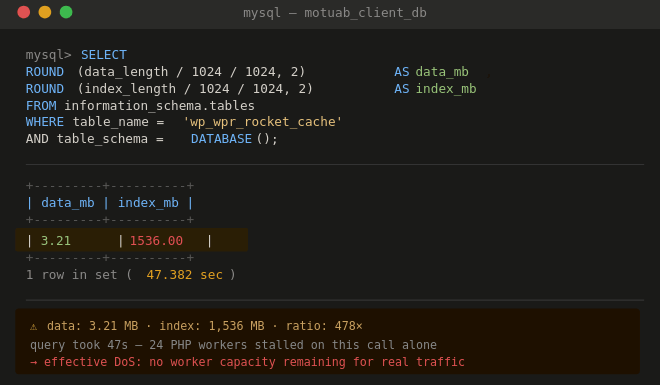
wp_wpr_rocket_cache) - On large WooCommerce sites, this table’s index can grow to 500× the size of the actual data – in our case 3 MB data, 1.5 GB index
- Queries to that table become so slow they hit PHP’s 60-second timeout
- 24 PHP workers stall simultaneously, starving the server of capacity
- Result: effective denial of service, caused entirely by a caching plugin
- Fix: disable auto-preload, truncate the table, use a scoped cron-based preload instead
Background: We Recommend WP Rocket
Let’s be clear upfront. WP Rocket remains one of the best performance plugins in the WordPress ecosystem. On the vast majority of sites, it does exactly what it promises: faster pages, smarter caching, better Core Web Vitals scores, with almost no configuration required.
This post is not a takedown. It’s a specific failure mode we encountered on a large managed WooCommerce site, documented here so others can spot it before it takes their server down.
The Setup
The site in question: a mature WooCommerce store with a substantial product catalog, active filtering via a faceted-search plugin, and standard WP Rocket configuration including auto-preload enabled. Nothing exotic. The kind of setup you’d find on hundreds of mid-to-large WordPress stores.
WP Rocket was installed, configured correctly according to its own documentation, and had been running without issue. Until it wasn’t.
The Failure Chain
Here’s exactly what happened, step by step:
1. Preload crawls every URL – including filter combinations
WP Rocket’s preloader follows the sitemap and any visited URLs. With a faceted filter plugin active, every attribute combination generates a unique URL – and WP Rocket preloads all of them.
2. Every URL gets a row in wp_wpr_rocket_cache
This is where WP Rocket tracks preload status: pending → in-progress → completed. With mobile cache enabled, each URL is crawled twice (desktop + mobile user agent), doubling the row count.
3. Cleanup runs only once per week
The rocket_preload_clean_rows_time_event cron runs weekly. On a site generating thousands of new preload URLs daily, that’s far too infrequent to prevent accumulation.
4. The table’s indexes balloon to grotesque proportions
This is the critical part that most documentation misses. The data in the table was around 3 MB. The index had grown to 1.5 GB. A ratio of roughly 500:1. MySQL’s index overhead was doing more work than the actual content.
5. Every preload status query becomes extremely slow
WP Rocket constantly queries this table to check and update URL status. With a 1.5 GB index in an unoptimized state, even simple lookups were taking many seconds. Timeouts started hitting 60 seconds.
6. PHP workers stall waiting for MySQL
Each hanging database query held a PHP-FPM worker. The preload runs continuously in the background, so this wasn’t an isolated event. Workers started piling up.
7. All 24 PHP workers exhausted → effective DoS
With all workers stalled on timed-out database calls, the site stopped serving real visitor traffic. No new requests could be processed. The site appeared down. The culprit: a caching plugin doing its job too enthusiastically.
⚠ Key insight
The symptom looked like a traffic spike or a server resource problem. It was neither. Server CPU and RAM were fine. The bottleneck was a single bloated MySQL index making routine plugin queries crawl to a halt.
Why This Happens: The Technical Root Cause
InnoDB (MySQL’s default storage engine) maintains indexes separately from table data. When a table accumulates millions of rows that are then frequently deleted and re-inserted – which is exactly what WP Rocket does during preload cycles – the index can become severely fragmented and disproportionately large relative to the actual data.
This fragmentation isn’t visible from the WordPress admin. You need to check it at the database level:
SELECT
  table_name,
  ROUND(data_length / 1024 / 1024, 2) AS data_mb,
  ROUND(index_length / 1024 / 1024, 2) AS index_mb,
  ROUND((data_length + index_length) / 1024 / 1024, 2) AS total_mb
FROM information_schema.tables
WHERE table_schema = DATABASE()
  AND table_name LIKE '%rocket%'
ORDER BY total_mb DESC;
If you see index_mb orders of magnitude larger than data_mb on wp_wpr_rocket_cache, you have this problem.
WooCommerce makes it worse in two specific ways:
- Product catalog scale. Even a modest store with 2,000 products and 50 filter attributes can generate tens of thousands of unique preloadable URLs.
- Frequent cache invalidation. Stock updates, price changes, and order events all trigger cache purges, which trigger new preload cycles, which generate new rows.
Who Is at Risk
| Factor | Risk Level |
|---|---|
| WooCommerce with 500+ products | Medium — monitor wp_wpr_rocket_cache |
| Faceted filtering plugin (Filter Everything, WOOF, FacetWP) | High — URL count multiplies by attribute combinations |
| Mobile cache enabled + preload | High — doubles row count automatically |
| High product update frequency (stock sync, imports) | High — constant cache purge → preload cycle |
| Small PHP worker pool (<16) | Critical — worker exhaustion hits faster |
The Fix
Step 1 — Immediate: Disable Preload
Go to WP Rocket → Preload and disable the preload cache feature. This stops new rows being added and stops the background crawl consuming workers.
Step 2 — Truncate and Rebuild the Table
-- Check the damage first
SELECT
  ROUND(data_length / 1024 / 1024, 2) AS data_mb,
  ROUND(index_length / 1024 / 1024, 2) AS index_mb
FROM information_schema.tables
WHERE table_name = 'wp_wpr_rocket_cache'
  AND table_schema = DATABASE();

-- Truncate if indexes are severely bloated
TRUNCATE TABLE wp_wpr_rocket_cache;

-- Then optimize to reclaim disk space
OPTIMIZE TABLE wp_wpr_rocket_cache;Note: Always take a full database backup before running any of the above. TRUNCATE is not reversible.
Step 3 — Exclude Filter URLs from Preload
Add a filter to stop WP Rocket preloading parameterised or filter-generated URLs. In your theme’s functions.php or a custom plugin:
add_filter( 'rocket_preload_excluded_urls', function( $excluded ) {
    // Exclude filtered/faceted URLs — adjust patterns to match your filter plugin
    $excluded[] = '.*\?filter_.*';
    $excluded[] = '.*\?orderby=.*';
    $excluded[] = '.*\?min_price=.*';
    $excluded[] = '.*\?pa_.*';  // WooCommerce attribute query strings
    return $excluded;
} );
Step 4 — Use a Scoped, Off-Peak Preload Instead
Rather than WP Rocket’s continuous auto-preload, use WP-CLI to preload a tightly controlled URL list during off-peak hours via a real server cron:
# Add to server crontab — runs at 3am, preloads from a custom sitemap only
0 3 * * * cd /var/www/html && wp rocket preload --url=https://yoursite.com 2>&1
Pair this with a custom, minimal sitemap that excludes filtered URLs, product variations, and paginated archives. You want to preload your high-value pages – homepage, category roots, top products – not every permutation the filter plugin can generate.
Step 5 — Add Monitoring
Add this query to whatever monitoring you use (Nagios, Zabbix, a simple cron alert script) to catch index bloat before it causes problems again:
SELECT ROUND(index_length / 1024 / 1024, 0) AS index_mb
FROM information_schema.tables
WHERE table_name = 'wp_wpr_rocket_cache'
  AND table_schema = DATABASE()
HAVING index_mb > 100;  -- Alert if index exceeds 100 MB
What WP Rocket’s Own Docs Say
To be fair to WP Rocket, their documentation does acknowledge server load as a concern on large sites. Their recommended mitigations for high CPU include running preload during low-traffic hours, decreasing batch sizes, or disabling preload entirely. The problem is that none of these warnings are visible when you enable the feature on a large WooCommerce install – and the failure mode (index bloat rather than CPU load) isn’t documented anywhere we could find.
The cleanup cron running weekly is also a design choice that works fine for small sites but compounds the problem on high-churn catalogs.
Summary: When to Think Twice About WP Rocket Preload
Our recommendation
Disable WP Rocket’s auto-preload on any WooCommerce site with more than a few hundred products, any faceted filtering plugin, or frequent stock/price updates. Use manual, cron-based preloading against a curated sitemap instead. You get most of the benefit with none of the risk.
For simple WordPress sites – blogs, brochure sites, small shops – WP Rocket’s preload is excellent and you should leave it on. The feature does exactly what it says. This is a specific edge case where the scale of WooCommerce, combined with the index fragmentation behaviour of InnoDB, turns a good feature into a liability.
Knowing when not to use a tool is part of managing infrastructure well. We learned this one the hard way, so you don’t have to.
Motuab is a managed hosting provider specialising in WordPress and WooCommerce. We run Nginx, PHP-FPM, MariaDB, Redis, and Cloudflare stacks with a focus on stability and transparency. If you’re experiencing unexplained slowdowns on a WooCommerce site, get in touch – this is often one of the first things we check.
Tags: WP Rocket, WooCommerce, MySQL, InnoDB, PHP-FPM, wp_wpr_rocket_cache, managed WordPress hosting, preload cache, database performance